June 16, 2026 · build log
Self-running agents inside Claude Code.
Everyone's buying an “autonomous agent” framework that wraps a raw LLM API, reinvents tool-calling, and bills you a second time per token. Meanwhile the best agent runtime that exists is already on your machine and already paid for: Claude Code. You just need the right loop around it. Three pieces do it — a goal, a loop, and claude -p — and the whole thing runs on your subscription with no API key in sight.
Repo: github.com/alejandroclvi/claude-agent-loops · MIT · two working examples (Reddit + X), a headless loop driver, and the field notes.
The whole idea in three boxes
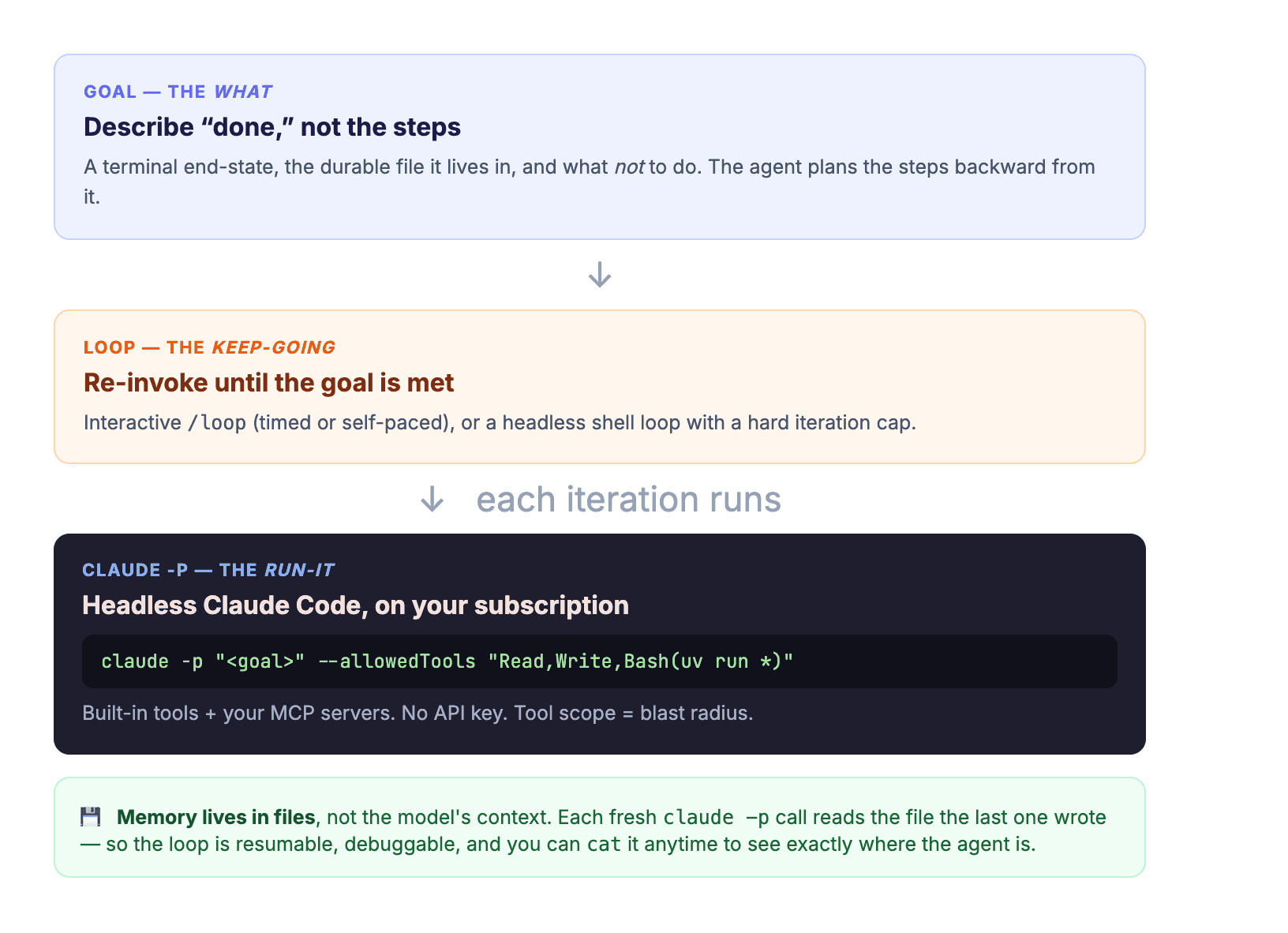
An agent is just three things wearing a trench coat: a goal (what done looks like), a loop (keep acting until done), and a runtime (something that can read state, decide, and act with tools). Most frameworks make you build all three. Claude Code already is the runtime. This repo supplies the other two and shows how to bolt them on cheaply.
The runtime you already pay for
claude -p “…” runs Claude Code non-interactively: it takes a prompt, does the work with its tools, prints the result, and exits. Two things make it the right engine for cheap autonomy. First, it bills to your Claude subscription / Claude Code login — there's no separate metered API key to manage, which is the entire cost advantage. Second, it inherits your whole toolbox: the built-in Read / Write / Bash / Grep, plus every MCP server you've already wired up. A tiny loop gets big capabilities for free.
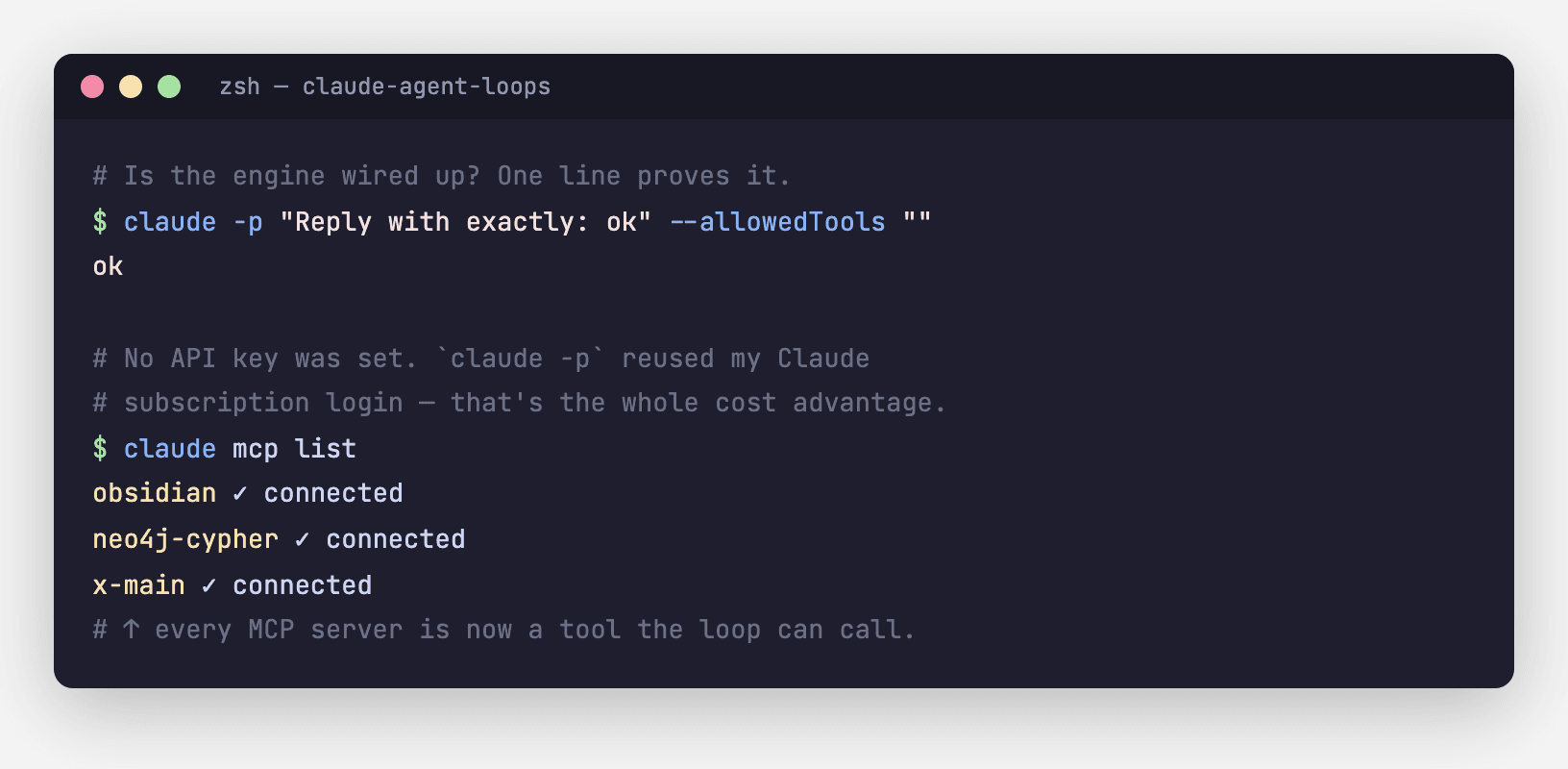
Worth clearing up the most common confusion: there is no API key to paste anywhere. If you can run claude interactively, you can run claude -p, and it's the same budget. (You can point it at the raw Anthropic API with ANTHROPIC_API_KEY for a headless server — but you don't have to, and the default path is what keeps this cheap.)
The goal: describe done, not the steps
The biggest mistake is scripting the steps. Don't. Describe the end state and let the agent plan backward from it. Compare:
- Brittle (you're doing the agent's job): “open the site, search this term, for each result if X then Y…”
- A goal (the agent figures out the steps): “Make
leads.jsonlcontain 5 fresh, deduped posts where someone wants automation set up for them. Don't message anyone.”
A good goal is terminal (there's an observable done), bounded (it says what not to do), and stateful (it names the file that survives between iterations). That last one is the secret: state lives in files, not the model's context. Each fresh claude -p call is amnesiac — but the file remembers, so the loop is resumable, debuggable, and you can cat it anytime to see where the agent is.
The loop: three rungs, climb only as high as you need
A single turn rarely finishes a real job, so the loop re-invokes the agent to build on its own output. There's a ladder:
- Manual. Run the script, read the JSON, run again. Primitive — and the best way to learn what your agent does before trusting it. You're the scheduler.
/loopinside Claude Code. Runs a prompt on an interval, or self-paced (the model decides when to go again, so it backs off when there's nothing to do). Great for supervised autonomy.- A headless shell loop around
claude -p. Fully unattended. A while-loop, a goal with aDONEtoken, a hard iteration cap, and a sleep. ~40 lines of bash. This is the “OpenClaw-but-native” core.
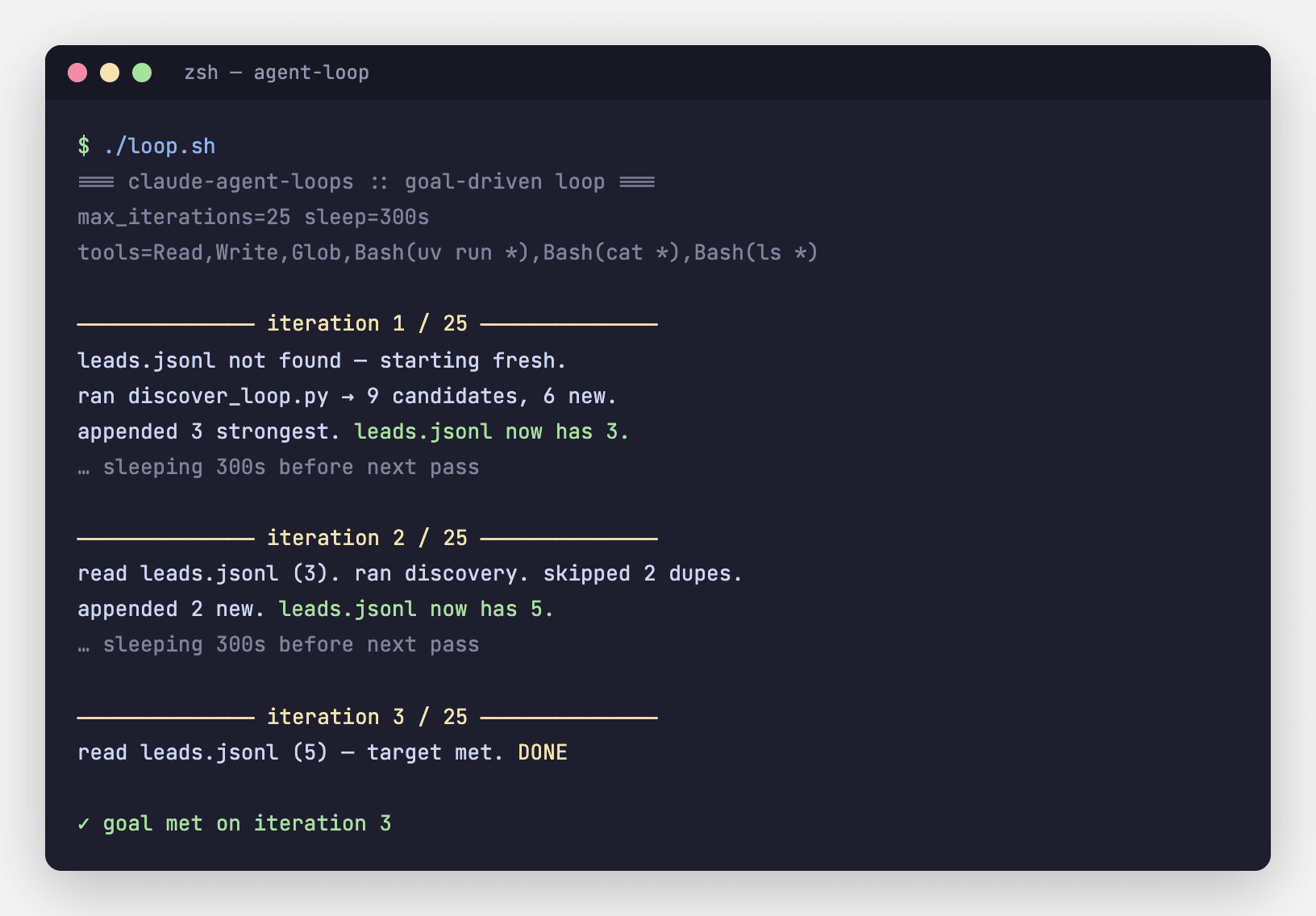
Four things keep that loop safe and cheap: a goal with an explicit DONE stop-condition; --allowedTools scoped to the minimum this job needs (your blast radius); a LOOP_MAX_ITERATIONS backstop so a confused agent can't run forever; and file-based memory so you can always see — and resume — the state.
Two examples that ship in the repo
The pattern is abstract until you watch it do real work. Both examples drive a logged-in social account through a saved browser session (no platform API key) and default to read-only — writing is opt-in and rate-limited.
- Reddit demand discovery. Searches the subreddits where people ask for help, scores each post with cheap heuristics (is this real demand, or a freelancer ad?), dedups against a local file, and prints candidates. Hand the toolbox to a goal-driven loop and it fills a
leads.jsonlfor you while you sleep. - X (Twitter) engagement. Search a topic, scrape a thread's replies, and — opt-in — reply. A natural loop: “find the 3 most genuine questions about building agents and draft a helpful, non-promotional reply into
drafts/. Don't post — drafts only.” Agent drafts, human sends.
The same shape generalizes far past social. A few I've run with this exact pattern, stripped to the idea:
- Content at scale. “Make every post under
/blogemit validFAQPagestructured data.” The loop walks the directory, adds the schema where it's missing, and stops when the whole corpus passes — hundreds of files, one goal. - Lead enrichment. “For each row in
list.csvwith noenrichedflag, add a real public URL and one grounded fact.” Name in, verified detail out, the file as the work-queue. - Inbox triage / monitoring. A self-paced
/loopthat reads new items, classifies them, and only pings you when something crosses a threshold — otherwise it stays quiet.
The real unlock: a second brain under the loop
Here's the part that turns a clever trick into a system. A single loop's leads.jsonl remembers one job. But that same instinct — memory lives outside the model, in something you can read — scales into a second brain: a persistent, cross-session memory layer that every agent reads before it does anything. The loops run on top of it.
Why it matters so much: a cold agent re-derives your whole world on every run — what the project is, your conventions, what's already been tried, who you already contacted. That's slow, expensive, and exactly how agents repeat yesterday's mistakes. An agent sitting on a second brain wakes up already informed.
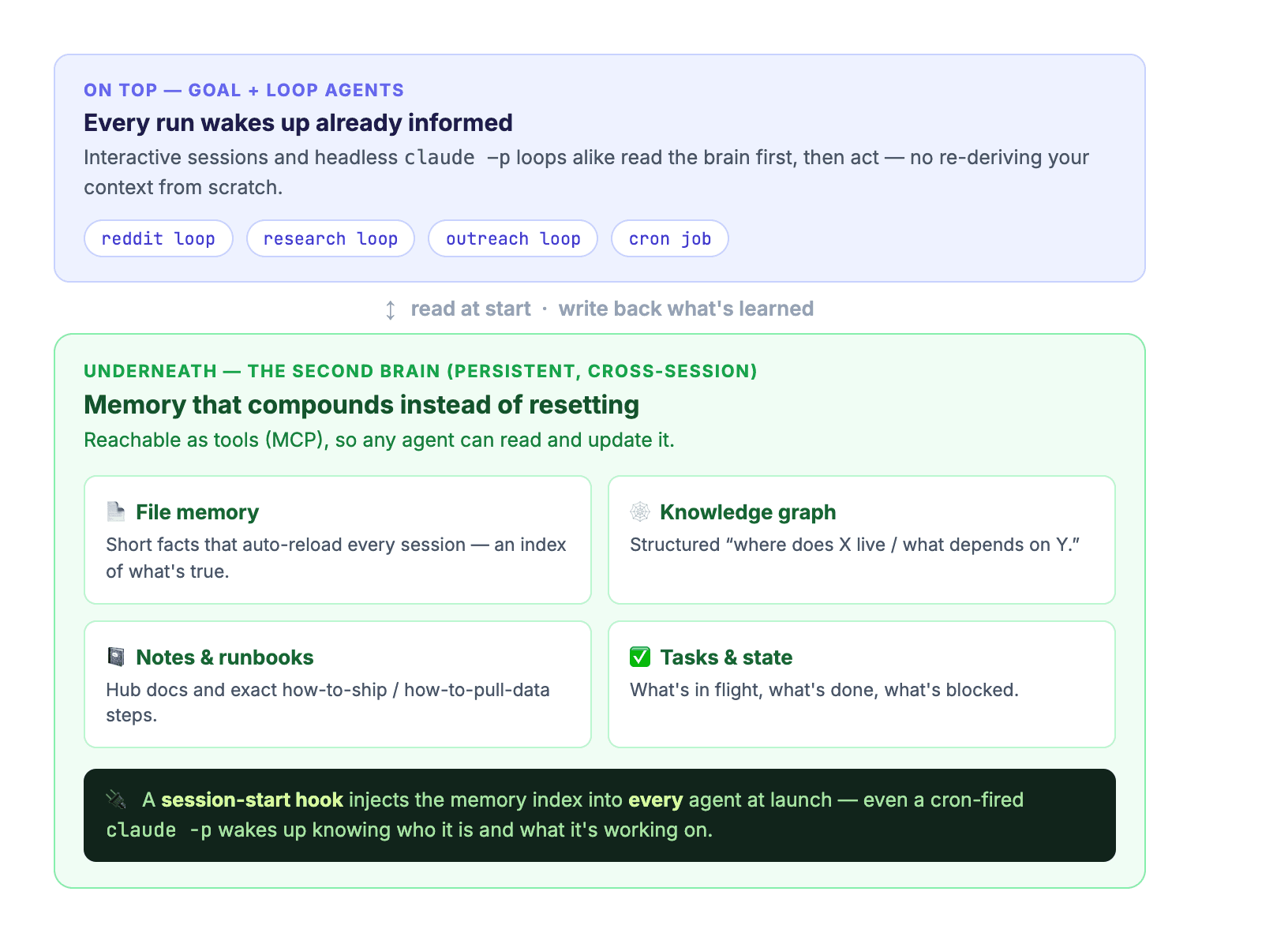
The shape I run is a few layers, each reachable as a tool (an MCP server) so any agent can both read and write it:
- Flat file memory — short facts that auto-reload every session. An index of what's currently true, in plain text you can edit.
- A knowledge graph (a local Neo4j) — structured answers to “where does X live / what depends on Y,” so an agent navigates instead of re-reading everything.
- A notes vault (Obsidian) — hub docs and runbooks: the exact how-to-ship, how-to-pull-the-data steps, written once.
- A task / state system — what's in flight, done, or blocked, so a loop knows where to pick up.
The mechanic that makes it automatic is a session-start hook: at launch it injects the memory index and a short operating manual into every agent — including the headless claude -p runs a cron job fires at 3am. The agent never boots blank. It opens knowing who it is, what it's working on, and the rules it operates under.
And that's what supercharges the goal + loop pattern. Your goal can now lean on durable knowledge instead of re-explaining it every time. “Find leads we haven't already contacted” just works, because the brain remembers who you contacted. Each loop's little file stops being a throwaway and becomes one more entry in a memory that compounds — the loop gets smarter the longer it's run, without you touching the model.
Setup, honestly
Fifteen minutes, and most of it is one-time. The full walkthrough is in docs/02-setup.md; the short version:
# 1. the runtime (log in once — that's your "token")
npm i -g @anthropic-ai/claude-code
claude -p "Reply with exactly: ok" --allowedTools ""   # → ok

# 2. python runner for the examples
brew install uv

# 3. configure + capture a browser login (once)
cp .env.example .env
cd examples/reddit-outreach
uv run --with patchright python login_capture.py

# 4. wrap it in a goal-driven loop
cd ../agent-loop && ./loop.sh
Service auth is the part people expect to be painful and isn't: instead of registering an app and juggling OAuth, you capture your own logged-in browser session once (login_capture.py opens a real browser, you log in, it saves the session) and reuse it. That saved file is as sensitive as your password — every auth/ path is gitignored by default, and it lives outside the repo.
The field notes (why this, not that)
Every shortcut in the repo exists because the “obvious” path broke. These are the war stories, because they're the actually-reusable part:
- “Just use the official API” — often you can't. Reddit's API got restrictive enough that a saved browser session on
old.reddit.com(clean JSON for reads, simple forms for writes) was the thing that just worked. The opposite also happens: some marketplaces strip the form you need from any page a browser-automation tool touches, and there the official API is the only route. The right answer is per-platform — probe each one and keep what survives. - Distrust silent success. I hit a stretch where a posting tool returned “success” while nothing actually posted. An agent that can't tell whether its action worked will confidently lie to you. So every write in these examples self-verifies — it re-reads the page and confirms the text actually appears before reporting success.
- When a managed flow rots, drop a layer. A Google-style OAuth / service flow that's supposed to authorize an automation can go half-broken — tokens that expire on an undocumented schedule, a “send” that silently no-ops. When a flow eats more time than it saves, drive the underlying action with a script you control and treat “token expired” as a 60-second re-auth, not a dead end.
- Platforms shadow-throttle. Strict subreddits silently remove links from low-karma accounts — the author sees their comment, nobody else does. If your agent “posts” but gets zero engagement, suspect invisible removal before you blame the copy. Keep those places discovery-only.
The meta-lesson: probe real behavior, distrust silent success, keep a lower-level fallback, and verify. That mindset — not any one script — is what makes a small, cheap loop reliable.
Why I'm building it this way
This is the same bet I keep making: put the intelligence in the harness, not the model. I proved a 2 GB local model beats an 8B on hard research once the harness was smart enough. This is the other side of that coin — the harness here is a loop, a goal, a stop condition, and a second brain underneath, and the“model” is the best one going, already paid for. Either way the durable value lives in the structure around the model — the loops, the memory, the rules — where it compounds and persists, instead of being rented per call.
It's ~40 lines of bash plus two example toolboxes. Read it — there's no magic, and that's the point. Clone it, change the goal to a file you care about, point it at your own tools (including any MCP server you've added), and let it run.